The boss key for Windows.One hotkey hides any app — window, taskbar button and tray icon.
Pick the apps you want out of sight. Press Ctrl+Alt+H and they are gone without a trace — and they stay hidden even when they open a new window. Press Ctrl+Alt+Shift+H and everything is back exactly where it was.
Free for up to 3 apps · Pro $19.99 once, not a subscription · Windows 11 & 10
Listed and reviewed on
Independent listings — no sponsorship, no affiliate links.
Why a dedicated tool
Minimizing isn't hiding. Everything else leaves traces.
Minimize and Win+D only move windows out of the way. The taskbar button stays, the tray icon stays in the corner, the sound keeps playing — and the next notification puts it all back on screen.
Hides only the apps you choose
- Minimize
- One at a time
- Win+D
- gohide
Taskbar button disappears
- Minimize
- Win+D
- gohide
Tray icon disappears
- Minimize
- Win+D
- gohide
Sound can go quiet
- Minimize
- Win+D
- gohide
New windows stay hidden
- Minimize
- Win+D
- gohide
One key brings everything back, in place
- Minimize
- Win+D
- If you touch nothing
- gohide
Features
Everything a boss key should do. Including the parts others forget.
Window, taskbar button and tray icon — together
Most hiders stop at the window. gohide also removes the taskbar button and the notification-area icon, on Windows 10 and on the current Windows 11.
Stays hidden when it pops up again
A hidden chat app gets a message, a hidden browser opens a link: the new window is caught and hidden too. Free, and on by default.
Global hotkeys, in every edition
Hide all, restore all, summon gohide, lock the screen — plus a hotkey per app. They fire from anywhere, even when gohide is only a tray icon.
- Hide all
- CtrlAltH
- Restore all
- CtrlAlt⇧H
- Show gohide
- CtrlAltG
Mute it — or freeze it
A hidden video goes silent. Pro can suspend the whole process, so a hidden game uses no CPU or GPU until it comes back.
Crash-safe by design
If gohide is killed while apps are hidden, the next launch restores all of it — windows, taskbar buttons, tray icons and suspended processes.
Privacy cover screen
“Hide all” can drop a work-looking screen over the desktop — a spreadsheet, a document, a code editor, or your own image — instead of a suspiciously empty desktop.
Auto-hide rules
Match by program name, window title or window class, wildcards included. Matching windows are hidden the moment they open — including apps that start with Windows.
Hot corners, mouse buttons, idle
Throw the pointer into a screen corner, press a mouse side button, or simply step away: everything hides without touching the keyboard.
Tested with the apps you actually use
- Discord
- Steam
- Chrome
- Edge
- Telegram
- OBS Studio
- VLC
- WeGame
- qBittorrent
- Everything
- Notepad++
- Tailscale
Windows, taskbar buttons and tray icons — checked on real Windows 11 and Windows 10 PCs.
See it in action
Real recordings, not mock-ups
Captured on a Windows 11 PC — the only thing added afterwards is the keypress labels.
Stays hidden when it opens a new window
Chrome is hidden, then asked to open a new window: it's hidden the moment it opens. Restore, and both windows come back.
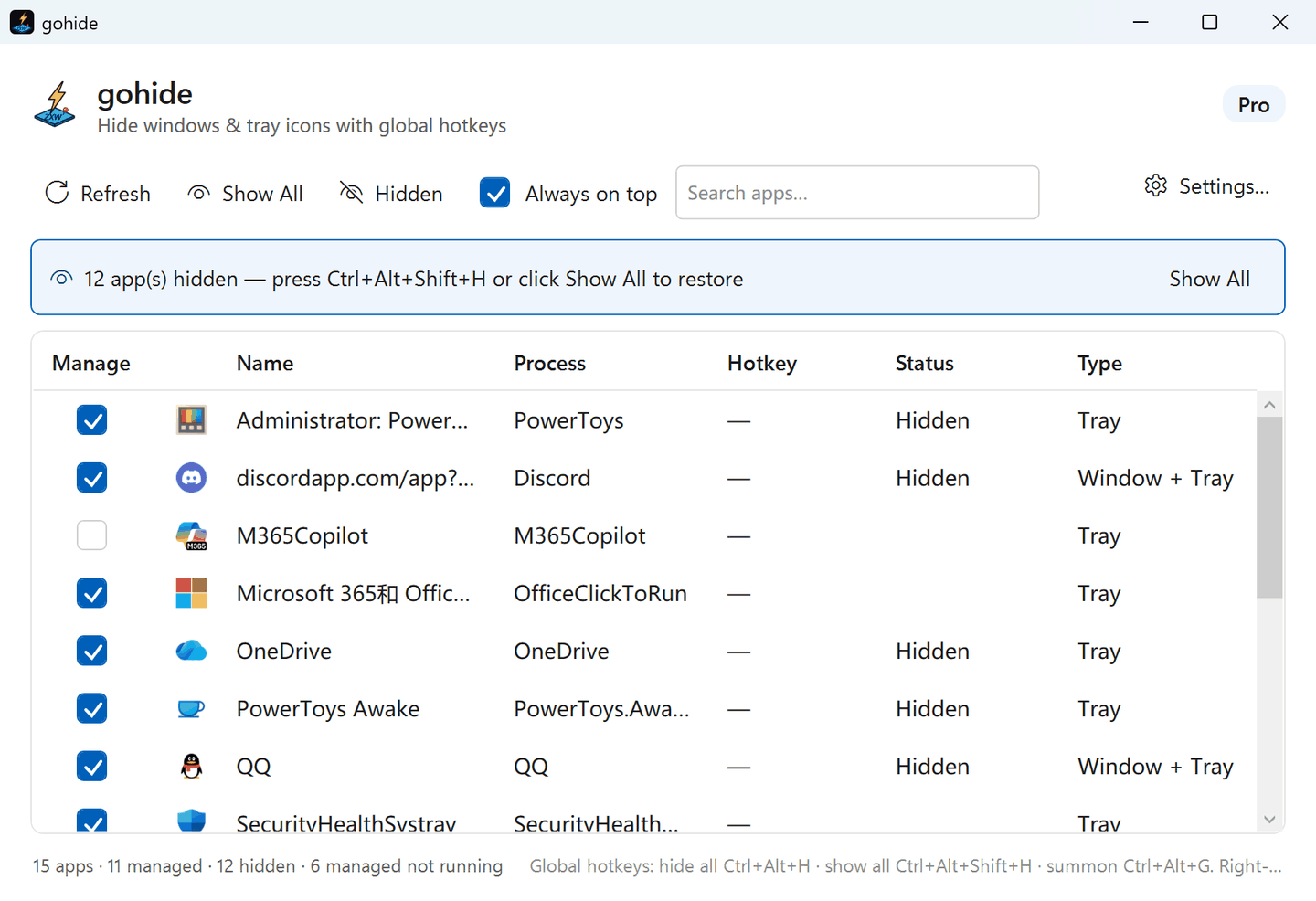
The actual interface — not a mockup
gohide on Windows 11 — one keystroke just hid 12 apps; the banner shows how to bring them all back.
Use cases
For when someone walks up behind you. Or the screen share starts early.
At the office
Someone stops by your desk: chat, shopping and video disappear in one keystroke, and come back when they leave.
Screen sharing & presenting
Clear chat, email and every off-topic tray icon before you share your screen, so only what you meant to show is on it.
Gaming
The classic boss key, modernized: the game window, its taskbar button and the launcher's tray icon go together — full-screen games included.
Shared & family PCs
Keep your own apps out of sight on a computer other people use. Everything runs locally and nothing is uploaded.
Privacy & trust
Local, reversible, yours. No account, no telemetry, no subscription.
Fully reversible
Nothing is deleted or permanently changed. One keystroke puts every window, taskbar button and tray icon back where it was.
Runs on your PC
No account, no analytics, no background web service. gohide never sees or sends what you hide.
Pay once, own it
Pro is a one-time purchase with free updates. You can activate it offline, and move it to a new PC yourself.
On the Microsoft Store
The Store edition is certified and signed by Microsoft and updates itself — no download warnings, no account.
- Latest release
- 5.7.3
- Runs on
- Windows 11 & 10
- Languages
- 6
- Pro, one-time
- $19.99
released Sep 27, 2026
x64
EN 中文 日本語 한국어 FR DE
no subscription
Pricing
Free to start. Pay once to go Pro.
No subscription, ever. Pro is a one-time perpetual purchase with free updates.
Free
- Hide windows, taskbar buttons & tray icons
- Hidden apps stay hidden — even when they open a new window
- Global and per-app hotkeys, plus one-key restore-all
- Lock-screen hotkey for emergencies
- Mute an app while it's hidden
- Up to 3 managed apps
- Your apps, global hotkeys and language survive a restart
- Works on the latest Windows 11 — tray icons too
- No account · no telemetry · fully offline
Pro
- Everything in Free, plus:
- Unlimited managed apps
- Every setting remembered across restarts — per-app hotkeys, cover screen, rules, triggers and PIN
- Suspend hidden apps — a hidden game or video freezes and uses zero CPU and GPU
- Privacy cover on “Hide all” — a built-in work-looking picture, your own image, or a harmless cover app; never a suspiciously empty desktop
- Auto-hide rules by program, title or window class (with wildcards) — catches windows that open later
- Hide chosen apps automatically when Windows starts — tray icons included
- Start gohide itself hidden — no window, no tray icon
- Hot corners & mouse-button triggers — hide everything without touching the keyboard
- Auto-hide when you step away — everything hides after 1–15 minutes idle
- PIN lock for Settings — nobody else can change your rules
- Priority email support
- All future updates included — major versions too
Pay once, keep it forever — every future update included, major versions too. One license covers one PC, and you can move it to a new PC yourself anytime. The free edition never expires, so take your time deciding. 3-day money-back guarantee.
Secure card checkout. Your license key is emailed the moment payment clears.
FAQ
Questions, answered
Is gohide a 'boss key'?
Yes — gohide is a modern boss key (panic button): one hotkey instantly hides the windows, taskbar buttons and tray icons you choose, and another restores them exactly where they were. Unlike classic boss-key tools it also hides system-tray icons and keeps working on the latest Windows 11.
Why not just press Win+D, minimize, or switch virtual desktops?
Those move windows out of the way; they don't hide them. A minimized app keeps its taskbar button. A window on another virtual desktop is one Task View away and still has its tray icon in the corner. All of them keep making sound, and Win+D lasts until the next click. gohide removes the window, the taskbar button and the tray icon together, can mute or pause the app, and puts everything back exactly where it was with one hotkey.
Is gohide safe to use?
Yes. gohide only acts on your own windows on your own machine — it has no telemetry, no accounts, and never sends anything about what you do or hide. Everything it does is fully reversible: one keystroke restores every window, taskbar button and tray icon exactly where it was.
Is Pro a subscription?
No. Pro is a one-time, perpetual purchase. You own that version forever and get free updates. There is no recurring charge.
Does tray-icon hiding work on the latest Windows 11?
Yes. gohide hides system-tray icons on the latest Windows 11. Its main route asks the shell to hide the icon and needs no access to the other app at all, so it reaches elevated, anti-cheat and Electron apps too — and Windows 11's Smart App Control doesn't affect it. A few apps don't expose what that route needs; for those gohide falls back to a small helper, which Smart App Control can block. Windows and taskbar buttons hide either way, and everything is restored the moment you bring things back.
What happens if a hidden app opens a new window?
It stays hidden. With “Keep an app hidden when it opens a new window” (Settings → General — free, and on by default), a window a hidden app opens later — a new chat message, a link opened in a hidden browser, a launcher's update prompt — is hidden the moment it appears, and comes back with the rest of the app when you restore. Turn it off if you'd rather relaunch a hidden app and use its new window.
Is gohide on the Microsoft Store?
Yes, and that version is signed by Microsoft, so it installs with no browser or SmartScreen warnings and updates itself. One thing is the same as the download from this site: gohide asks for admin once at startup, which it needs to manage other apps' windows and tray icons.
Can I get a refund?
Yes. gohide Pro comes with a 3-day money-back guarantee — if it's not right for you, email support within 3 days of purchase for a full refund. We also offer a free edition with no time limit, so you can confirm gohide works on your PC before buying Pro.
Take back your taskbar.
Download gohide free and hide your first app in under a minute.